

Strings in Python: From Sequences to Real-World Text Processing
by Divya Kolmi
1/31/20263 min read
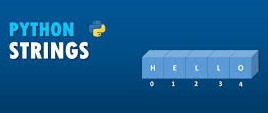
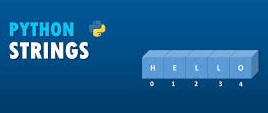
In programming, data is not always numeric. Emails, names, product descriptions, logs, and user inputs are all text-based. In Python, text is handled using strings, which are best understood as ordered sequences of characters. This idea of “sequence” is the foundation for almost everything you do with strings.
Strings as Sequences
A string stores characters in a specific order, and Python allows you to access each character individually using an index. Consider this example:
fruit = "banana"
letter = fruit[1]
print(letter)
The output is a, which often surprises beginners. That’s because Python uses zero-based indexing. The first character lives at index 0, not 1.
print(fruit[0]) # b
This indexing system is consistent across Python and many other programming languages. Once you internalize it, working with strings becomes much more predictable.
Index Rules
Indexes must always be integers. Python does not allow fractional or non-numeric indexes:
fruit[1.5]
This results in a TypeError because positions in a sequence must be exact. Python enforces this strictly to avoid ambiguity.
Measuring String Length with len()
To understand how many characters a string contains, Python provides the built-in len() function:
fruit = "banana"
length = len(fruit)
print(length) # 6
However, using this value incorrectly can cause errors. For example:
fruit[length]
This raises an IndexError because the highest valid index is length - 1.
The correct way to retrieve the last character is:
Or more elegantly, using negative indexing:
fruit[-1]
Negative indexes count backward from the end and are widely used in real-world Python code.
fruit[length - 1]
Traversing Strings
Many applications require examining text character by character, such as validating input, analyzing text, or parsing logs. This process is called string traversal.
A traversal using a while loop looks like this:
index = 0
while index < len(fruit):
print(fruit[index])
index += 1
A cleaner and more Pythonic approach uses a for loop:
for char in fruit:
print(char)
Both approaches achieve the same result, but the for loop is preferred for readability and simplicity.
Extracting Substrings with Slicing
A slice allows you to extract a portion of a string. The slicing syntax [start:end] includes the start position but excludes the end.
s = "Monty Python"
print(s[0:5]) # Monty
print(s[6:12]) # Python
Slices are flexible. You can omit indices to simplify expressions:
fruit = "banana"
fruit[:3] # ban
fruit[3:] # ana
Using fruit[:] creates a copy of the entire string, which is useful when you want to preserve immutability while working with variations.
Why Strings Are Immutable
Strings in Python cannot be modified in place. Attempting to change a character directly results in an error:
greeting = "Hello"
greeting[0] = "J" # Error
Instead, Python encourages creating new strings:
new_greeting = "J" + greeting[1:]
print(new_greeting) # Jello
This design prevents accidental data corruption and makes string operations safer and more predictable.
Counting Patterns in Text
Counting occurrences of characters or words is a common analytical task. Here’s a simple example that counts how many times a letter appears:
word = "banana"
count = 0
for letter in word:
if letter == "a":
count += 1
print(count)
This pattern - initialize, iterate, update - is foundational in data analysis, text mining, and automation tasks.
Membership Testing with in
Python allows you to quickly check whether a substring exists within a string:
"a" in "banana" # True
"seed" in "banana" # False
This is especially useful for validation, filtering, and search logic.
Comparing Strings Safely
Strings can be compared alphabetically using relational operators:
if word < "banana":
print("Comes before banana")
However, Python treats uppercase and lowercase letters differently. To ensure consistency, it’s common practice to normalize strings:
word.lower()
This avoids unexpected results in sorting and comparisons.
String Methods
Strings come with built-in methods that simplify common tasks:
word = "banana"
word.upper() # BANANA
word.find("na") # 2
word.strip() # removes surrounding whitespace
These methods do not modify the original string; they return new strings, reinforcing immutability.
Methods like startswith() are especially useful for safe checks:
line.startswith("#")
Unlike direct indexing, this approach avoids runtime errors when strings are empty.
Parsing Structured Text
Suppose you need to extract a domain name from an email log:
data = "From stephen.marquard@uct.ac.za Sat Jan 5"
at = data.find("@")
space = data.find(" ", at)
domain = data[at + 1 : space]
print(domain)
This approach - locate positions, then slice - is a core text-processing strategy used in data engineering and analytics.
Dynamic Text with Formatted Strings (f-strings)
Formatted string literals allow values to be embedded directly into text:
count = 42
f"I have processed {count} records."
F-strings make code more readable and are widely used in reporting, logging, and dashboards.
Debugging Strings
String operations often fail when assumptions are violated. For example, accessing line[0] fails if the string is empty. A safer approach is:
if line.startswith("#"):
Or using a guardian condition:
if len(line) > 0 and line[0] == "#":
These patterns reflect professional programming habits - anticipating edge cases before users encounter them.
Strings are not just text containers. They are structured, indexed, immutable sequences that power communication between humans and systems. Mastering strings is essential for fields ranging from business analytics and data science to software architecture and automation.
Once you understand how strings behave, you gain precise control over one of the most important data types in programming.
Explore More Business Articles
Contact
Questions? Reach out anytime.
© 2025 BizSphere. All rights reserved.